What Is Post Call Workflow Automation?
How post call workflow automation turns conversations into structured outcomes, captured fields, review signals, routing, and clear next actions.
A lead says they are ready for a valuation. A borrower asks for a callback next Tuesday. A service enquiry sounds promising, but needs a human review before anything is booked. The call itself matters, but what happens next usually decides whether that conversation turns into revenue or goes stale.
That is where post call workflow automation becomes operationally useful.
For teams that live on the phone, the problem is rarely just making more calls. It is the gap between the call ending and the next action actually happening. Notes are patchy, outcomes are inconsistent, follow-up sits in someone's head, and no one is fully sure which leads need attention now versus later.
Good automation closes that gap. Bad automation just moves the mess around faster.
At DialoGrove, we think about post call workflow automation as part of the full calling workflow, not as an afterthought. A call should not end as a recording, a transcript, or a vague CRM note. It should leave the team with a clear outcome, structured fields, review signals, and a next action that fits the business process.
What post call workflow automation should actually do
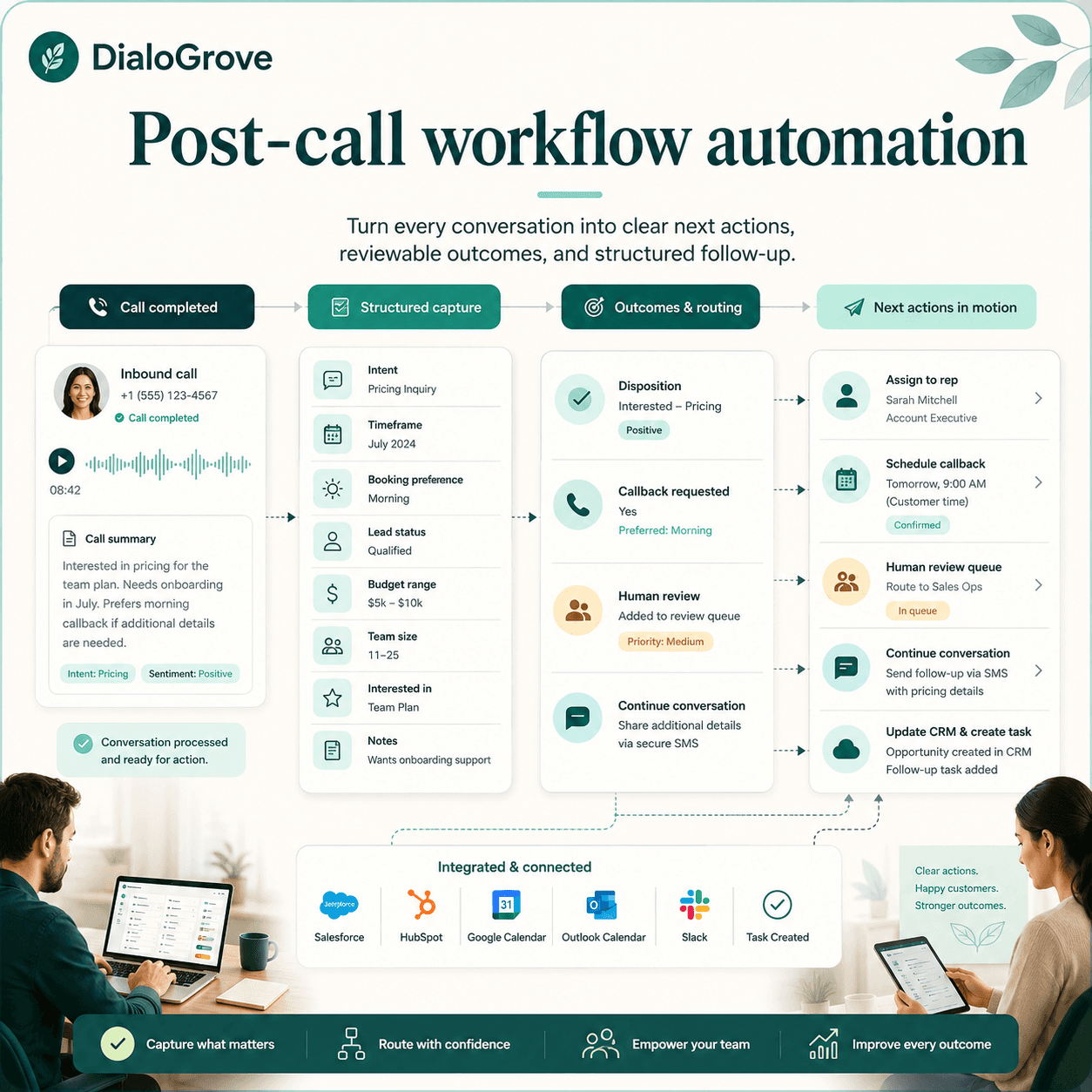
At a practical level, post call workflow automation is the set of actions triggered after a phone conversation finishes.
That can include:
- saving a transcript and recording
- assigning a call outcome
- capturing structured fields
- flagging buying signals
- routing the lead to the right person
- creating a review task
- scheduling the next follow-up
- updating a CRM or calendar where integrations are available
- triggering a handoff or continuation path when the conversation needs to move somewhere else
The key point is that it should not stop at recording what was said.
A transcript on its own is not a workflow. It is evidence. Useful systems turn the conversation into operational outputs the team can work with immediately.
For example, a real estate team might need the call to capture whether the contact is buying, selling, both, or just researching. An open home follow-up workflow might need interest level, buyer temperature, value expectation, objections, liked features, disliked features, and recommended next action. A mortgage business may need borrowing timeframe, loan purpose, refinance intent, and whether the lead is ready for a broker conversation. A service business may need to tell the difference between a booking-ready customer and someone who still needs a quote.
The automation should reflect that reality.
This is why workflow design matters. The system needs to know what information matters for the use case, what outcomes are valid, when a human should review the result, and what should happen next.
Why manual post-call work breaks down
Most follow-up problems are not caused by a lack of effort. They come from volume, inconsistency, and timing.
When reps or admin staff are handling dozens of calls, post-call admin gets rushed. One person writes detailed notes, another types two vague lines, and someone else plans to update the CRM later and never gets back to it. Over time, that creates a pipeline full of unclear records and weak prioritisation.
Speed matters too. If a lead has shown intent on the call, waiting half a day for someone to interpret notes and route the next task is often enough to lose momentum. The business does not need more information at that point. It needs a reliable process that turns the conversation into action while the intent is still fresh.
There is also a control issue. If outcomes are entered differently by each person, reporting becomes unreliable. One rep marks a lead as qualified, another uses interested, another leaves a note saying call back next week. None of that helps operations managers understand pipeline quality or workload.
Post call workflow automation is useful because it standardises the handover after the call. It helps the team move from "someone spoke to them" to "we know what happened and what to do next."
What good post call workflow automation looks like
The best setups are structured, visible, and specific to the customer journey. They do not try to guess everything from a freeform conversation. They define what matters, capture it consistently, and apply clear rules afterwards.
That usually means the workflow is built around a few practical layers.
First, the call produces a record of the interaction, such as the transcript, recording, summary, and disposition.
Next, the system extracts or captures fields the business actually uses. In real estate, that might include suburb, property intent, price expectation, inspection feedback, lead source, buying timeframe, or callback preference. In mortgage, it might include refinance intent, loan purpose, borrowing stage, and urgency. In appointment-led services, it might include location, service need, timing, and booking preference.
Then the platform applies routing and next-step logic based on those signals.
That logic might send a hot lead to a sales rep, push an uncertain case into a human review queue, create a task for a callback at a chosen time, or mark the lead as closed with a reason. The point is not to automate everything. The point is to remove avoidable delays and inconsistencies after each call.
A controlled platform such as DialoGrove is built around this principle. The call is not treated as an isolated event. It becomes part of a defined workflow with visible questions, captured outputs, review points, configurable handoff, and next actions.
Post call workflow automation needs structure, not just AI
A common mistake is assuming that if an AI can hold a conversation, it can also manage the follow-up without much design.
That is where businesses get burnt.
If the post-call process is vague, the outputs will be vague too. If there is no clear distinction between qualified, not qualified, follow up later, callback requested, do not contact, and human review required, the system cannot reliably support operations. You end up with lots of text and not much clarity.
That is why structured playbooks matter.
A buyer reactivation workflow needs different outcomes from an inbound discovery call. Appointment booking needs different follow-up logic from seller qualification. Open home follow-up needs different feedback aggregation from a general buyer enquiry. Rental inspection follow-up needs different next steps from mortgage enquiry qualification.
When the workflow matches the use case, the post-call automation becomes useful instead of noisy.
It also makes oversight easier. Managers can see what the agent is asking, which data points are being collected, how outcomes are assigned, and where human intervention is expected. That visibility matters for quality control, training, and compliance-conscious operations.
In DialoGrove, this is why playbooks, structured outputs, review queues, and action routing are part of the product model. The goal is not simply to make an AI voice agent sound natural. The goal is to make the whole call workflow easier to trust and operate.
Where teams usually see the value first
The immediate gains from post call workflow automation tend to show up in three places: response speed, consistency, and prioritisation.
Response speed improves because the next action does not wait for manual note writing. If the call indicates urgency, that lead can be routed straight away. If a callback is requested, it can be queued with context attached. If a lead is clearly not suitable, the record can be closed properly rather than left floating in the CRM.
Consistency improves because every call is evaluated against the same outcome logic. That helps businesses compare lead quality across campaigns, reps, agents, sources, or channels without relying on everyone to write notes the same way.
Prioritisation improves because teams no longer have to read through transcripts or guess from patchy CRM updates. They can work from structured signals: ready now, nurture later, review needed, book appointment, recontact requested, do not contact, or do not proceed.
Those are not flashy benefits, but they are the ones that reduce lost opportunities and operational drag.
For real estate teams, this can mean open home attendees are not just called. Their feedback can be aggregated at the property level. Across multiple inspections, the team can see buyer temperature, interest level, price sentiment, common objections, value expectations, and recommended next actions. That helps the agent follow up better, but it can also help the vendor understand how the market is responding.
For mortgage teams, it can mean a broker receives a cleaner handoff with borrowing purpose, urgency, refinance intent, callback preference, and review flags. For service businesses, it can mean booking-ready enquiries are separated from quote requests, wrong-fit leads, or cases that need human review.
The principle is the same across domains: the call should create usable operational data.
Why conversation continuation and handoff matter
Post call workflow automation is not always about ending the call and creating a task.
Sometimes the right workflow is to continue the conversation in a more suitable path.
A caller might begin in a general enquiry flow and then show seller intent. A buyer might need to move from open home feedback into a callback request. A service customer might need booking support. A mortgage lead might need a broker follow-up rather than another qualification question.
This is where configurable handoff and conversation continuation become important.
In DialoGrove, handoff is treated as part of the agent configuration and workflow design. A workflow can be designed so that certain outcomes continue to another agent, specialist path, review queue, or human follow-up, depending on what the conversation reveals.
The point is not to create a maze. The point is to avoid dead ends.
Good post call workflow automation should make it clear:
- when the conversation is complete
- when the lead needs review
- when a callback should be created
- when a human should step in
- when the next workflow should continue the conversation
- what context should move with the handoff
Without that, teams often repeat discovery, lose context, or make the customer explain the same thing again.
The trade-offs to think through
Post call workflow automation is not a licence to remove judgement.
Some conversations are straightforward. Others are messy. A lead may sound interested but still need clarification. A customer may ask something outside the intended flow. A transcript may capture the words accurately while missing the business nuance.
That is why review queues matter.
Not every call should trigger a fully automated action. In some workflows, it makes sense to route edge cases to a person before a booking is confirmed or before a lead is handed to a closer. In others, basic administrative steps can happen automatically while the sales decision stays with the team.
There is also a balance between capturing enough information and overengineering the process. If you ask for too many data points, the workflow becomes brittle and harder to maintain. If you capture too little, the outputs are not actionable. The right level depends on the use case, the volume of leads, and how much variation exists in the conversations.
The best workflow is usually not the most complex one. It is the one your team can understand, review, and improve.
How to assess whether your workflow is ready
Before adding automation, it is worth checking whether your post-call process is clear enough to automate in the first place.
If your team cannot agree on what counts as a qualified lead, what the possible outcomes are, or which fields must be captured after a call, the first job is not technology. It is workflow design. The same goes for escalation points. You need to know when a call can move forward automatically and when it should pause for human review.
A useful test is simple: after any given call, can the business answer four questions consistently?
- What happened?
- What was captured?
- What outcome was assigned?
- What should happen next?
If those answers vary by staff member, post call workflow automation will expose the inconsistency rather than fix it.
Once those rules are defined, automation becomes much more valuable. It can enforce process, improve speed, and produce cleaner reporting without turning the operation into a black box.
What to look for in post call workflow automation software
If you are comparing platforms, avoid judging only by whether they can make or record calls.
A good post call workflow automation platform should help you design and operate the full workflow around the call.
Look for:
- playbooks for specific use cases
- structured call outcomes
- captured fields that match your workflow
- transcripts and recordings for review
- human review queues
- configurable routing and handoff
- callback and next-action handling
- CRM or calendar integrations where available
- visible workflow logic
- auditability across the call and the actions that follow
This is where platforms like DialoGrove are different from generic calling tools. The value is not only that the call can happen. It is that the result of the call becomes structured, reviewable, and connected to a next step.
For businesses that handle lead follow-up at scale, that difference matters.
A better standard for follow-up
For sales and service teams, the biggest risk after a call is not a lack of conversation data. It is failing to turn that data into the next right action.
Post call workflow automation works when it is built around real operational decisions, not generic AI promises.
That means structured outcomes, useful captured fields, clear routing logic, sensible human oversight, and the ability to continue or hand off the conversation when needed.
When those pieces are in place, every call leaves behind more than a recording. It leaves behind direction, accountability, and a lead pipeline that is easier to work.
If your team is still relying on memory, rushed notes, or manual clean-up after every conversation, that is usually the clearest sign the workflow needs attention first.
DialoGrove is built for that kind of workflow-led follow-up. The platform helps teams turn calls into structured outcomes, reviewable actions, and clearer next steps, without treating AI as a black box.
Anyone who wants to experience the workflow can try a real-time demo call from dialogrove.ai. Just enter your name and number, and the demo agent will call so you can see how a structured AI voice workflow feels in practice.