How to Automate Lead Screening Without Losing Control
How to automate lead screening with defined outcomes, structured capture, clear routing, and human review where judgement matters.
A lead sits in your CRM for 47 minutes before anyone calls. By then, the buyer has already spoken to someone else, the seller has lost interest, or the enquiry has gone cold enough to need a second attempt. That is usually where the question of how to automate lead screening starts, not with AI for its own sake, but with a gap between incoming demand and consistent follow-up.
For phone-based businesses, lead screening is not just a sorting task. It is the first real conversation that decides whether a lead gets booked, routed, nurtured, deprioritised, or reviewed by a person. If that stage is slow, inconsistent, or poorly documented, everything downstream gets messier. Reps chase the wrong people, good leads wait too long, and CRM notes become too vague to trust.
The practical way to automate lead screening is to treat it as an operational workflow, not a magic prompt. You need clear questions, clear outcomes, and clear handoffs. Automation works best when it follows a defined path and gives your team visibility into what happened on each call.
That is also why controlled platforms like DialoGrove are useful. The goal is not just to have an AI caller speak to leads. The goal is to turn the conversation into structured outputs, next actions, human review points, and clean handoff when the lead needs to move to a rep, broker, agent, or specialist.
What lead screening should actually do
Before choosing any tool or workflow, define the job. Screening is meant to answer a few practical questions.
- Is this lead contactable?
- Are they the right fit for your service?
- How urgent is their need?
- What signals suggest intent, hesitation, or poor timing?
- What should happen next?
That sounds simple, but many teams still rely on reps to interpret those questions differently every time. One person asks about timeline. Another forgets. One person logs a detailed note. Another writes "keen, call back". That variation creates reporting problems as much as sales problems.
Good automation reduces that inconsistency. It helps every lead move through the same qualification logic, while still allowing for human review when a conversation is unclear, sensitive, or commercially important.
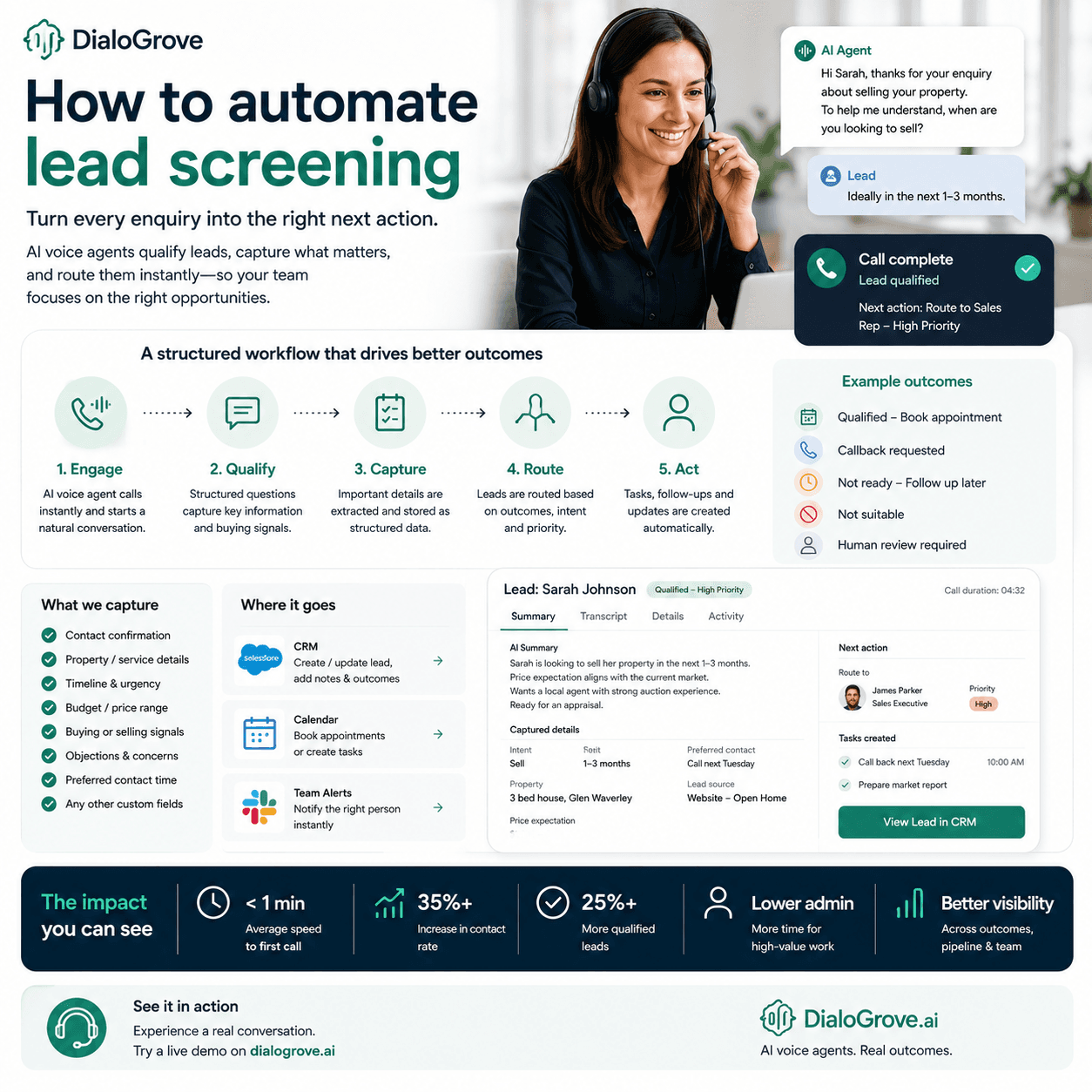
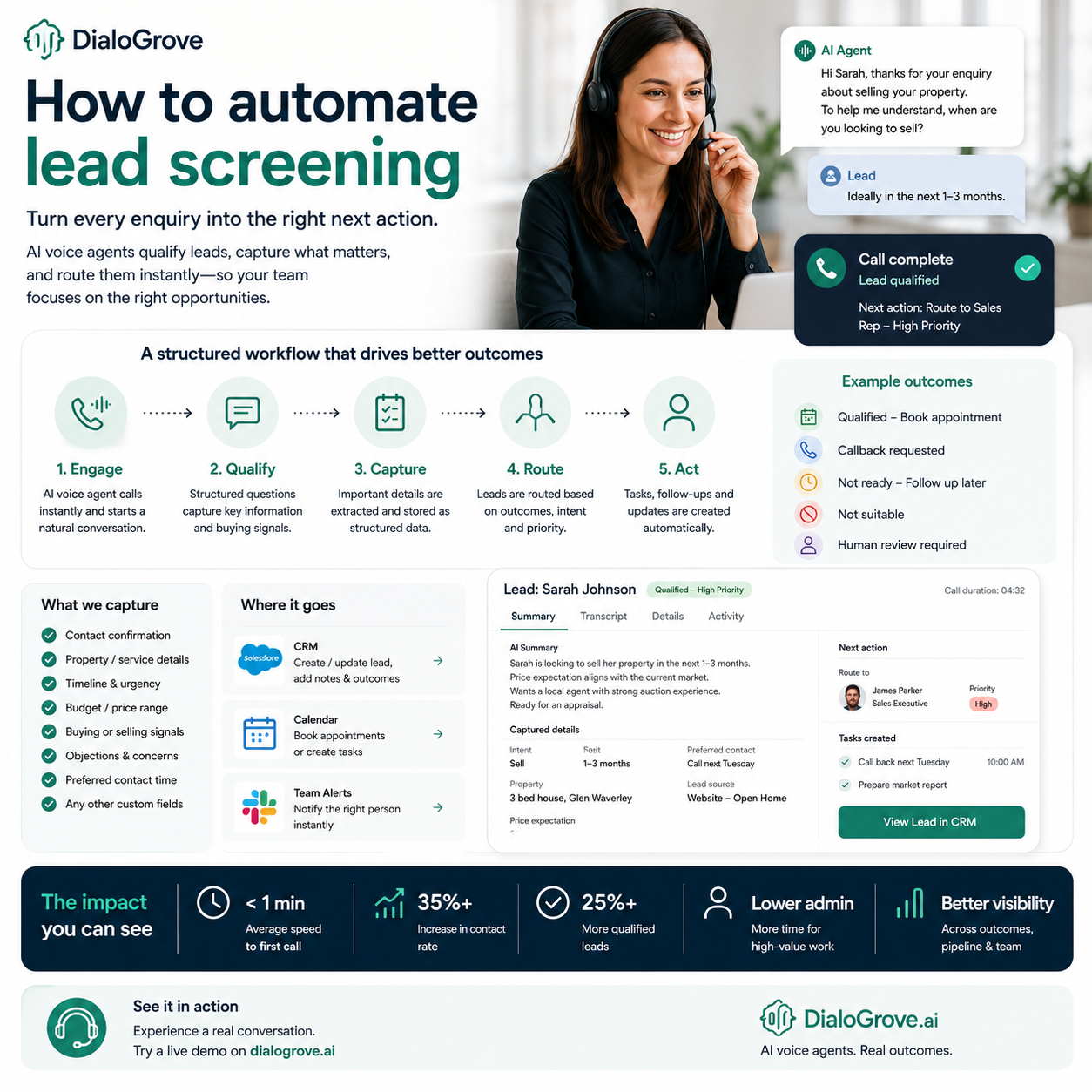
In practice, a useful lead screening workflow should do more than save a transcript. It should capture the fields your team actually uses, assign a meaningful outcome, and trigger the next operational step. In DialoGrove, that typically means a playbook-driven call flow, structured capture, configurable routing, and review where needed.
How to automate lead screening without losing control
The best starting point is not the script. It is the outcome map. Decide what your lead statuses actually mean and what should trigger each one. For example, a lead might be marked:
- qualified for booking
- needs follow-up
- not contactable
- not suitable
- human review required
Those outcomes should not be vague labels. They should drive a next action.
Once outcomes are defined, work backwards into the conversation. What does the call need to capture in order to place a lead into the right bucket? Usually that includes contact confirmation, reason for enquiry, level of interest, timing, location or service area, and any business-specific qualifying fields. In some businesses it may also include budget range, property status, funding stage, or whether the lead is acting for themselves or someone else.
This is where many automation projects go wrong. Teams try to build a highly flexible AI caller before they have agreed on what the workflow needs to produce. If you cannot explain what data points matter, who gets the lead next, and when a person should step in, the automation will only create faster confusion.
A stronger approach is to design the lead screening workflow as a repeatable playbook. That playbook should define:
- what the caller is trying to achieve
- which questions matter most
- which fields must be captured
- which outcomes are allowed
- when to continue the conversation
- when to hand off
- when to stop and send the call for review
That structure is what helps teams automate lead screening without turning it into a black box.
Start with one lead journey
Do not automate every lead type at once. Pick one journey where the value is obvious and the qualification path is reasonably repeatable. Inbound web enquiries, reactivation lists, appointment requests, and after-hours follow-up are usually strong starting points.
A narrow first use case makes testing easier. You can hear where leads get confused, which questions feel unnecessary, and where outcomes need refining. It also gives your team a chance to build trust in the process before expanding it.
For example:
- a real estate team might start with buyer enquiry screening
- a mortgage business might start with inbound borrower qualification
- a service business might start with quote request screening
- a healthcare or admin-heavy team might start with intake triage
The narrower the starting workflow, the easier it is to improve.
Keep the call structure tight
A screening call should be structured enough to produce usable outputs, but natural enough to feel like a real interaction. That means fewer broad, open-ended prompts and more purposeful questions that capture what the business needs to know.
If a question does not affect routing, follow-up priority, or next action, it may not belong in the first screening call. Long calls do not always mean better qualification. Often they just create more noise for the team reviewing them later.
This is one of the reasons DialoGrove focuses on use-case-specific playbooks rather than a blank caller. A buyer screening workflow needs different logic from seller qualification, borrower intake, or service triage. The more closely the workflow matches the lead journey, the cleaner the outputs tend to be.
Build around capture, routing, and review
If you want to know how to automate lead screening well, focus on the three parts that matter after the call finishes.
1. Capture
The system should record what was said and turn the conversation into usable business outputs. That includes transcripts, summaries, structured fields, call outcomes, and clear notes on intent or objections. A call that ends with only an audio file is not much operational help.
2. Routing
The result of the call should decide what happens next. Qualified leads might go straight to a rep queue or booking flow. Leads with moderate intent may need a timed follow-up. Unclear or high-value calls may need human review. Not-contactable leads may go into a retry sequence with sensible controls.
This is also where DialoGrove's workflow approach matters. It is not just about reaching someone. It is about deciding whether the right next step is to assign a rep, queue a callback, flag review, continue the conversation in another channel, or update downstream systems.
3. Review
Some conversations are too important or too ambiguous to leave entirely to automation. A lead may give conflicting answers. A buyer may sound serious but cautious. A seller may reveal a time-sensitive reason that deserves a faster response. Good systems allow these calls to be flagged, checked, and actioned by a person.
This is the difference between useful automation and black-box automation. Useful automation gives your team speed and consistency, but still lets them inspect what happened and override decisions where needed.
What to include in an automated screening workflow
Most phone-based lead screening workflows need five core elements.
1. Entry rules
Which leads should be called, when, and under what conditions? That includes source, timing, business hours, retry logic, and do-not-contact controls.
2. Qualification logic
What questions are asked, in what order, and what answers change the path of the call? Some leads should move quickly to booking. Others need more context before they can be classified.
3. Outcome assignment
Each call should finish with a defined result rather than a generic note. Teams perform better when every conversation lands somewhere operationally clear.
4. Post-call automation
Once the call ends, the system should update records, assign owners, trigger tasks, and prepare the next step. Otherwise your team still ends up doing manual admin around an automated conversation.
In DialoGrove, this can include structured captured fields, summaries, review flags, routing decisions, and integrations that push the outcome into the systems your team already uses.
5. Oversight
Draft testing, call reviews, exception queues, and audit trails matter. Especially in sales and service workflows, being able to see what the agent asked, what the lead said, and why an outcome was assigned is part of keeping standards high.
Post-screening workflow matters as much as the call
One of the biggest mistakes teams make when automating lead screening is stopping at the conversation itself. But the call is only one part of the workflow.
What happens afterwards often decides whether the automation creates value.
A lead who is ready now may need a fast handoff to a person. Someone who asks for a callback next Tuesday should not be treated the same way as someone who wants to book now. A contact who is partly qualified but still uncertain may need the conversation to continue with extra context rather than starting from scratch.
This is where configurable handoff and conversation continuation become useful. In DialoGrove, the workflow can be designed so the next step is not only a disposition, but a practical action:
- assign to the right person
- create a callback task
- trigger a review queue
- continue the conversation through a configured handoff
- push context into CRM or scheduling workflows
That is what makes lead screening operationally useful rather than just interesting.
Trade-offs to expect
Automation speeds up first contact and standardises qualification, but it will not remove judgement from the process entirely. Some businesses have simple lead criteria and can automate more aggressively. Others rely on nuance, relationship context, or complex service fit, so they need stronger review steps.
There is also a balance between speed and depth. If you try to capture everything on the first call, the experience may feel heavy and conversion can drop. If you capture too little, your team gets fast calls but poor handover quality. The right design depends on your sales cycle, lead volume, and what your team genuinely needs before taking over.
Another trade-off is between flexibility and control. A freeform AI setup may sound attractive, but structured workflows are usually easier to test, measure, and improve. For most teams, especially those with multiple reps or operators, control beats improvisation.
Measuring whether it is working
The first metric is speed-to-lead. If automation is doing its job, more leads should be contacted sooner. After that, look at contact rates, qualification rates, booking rates, and the percentage of leads that end each call with a clear outcome.
Also check quality metrics. Are notes more useful? Are buying signals being captured consistently? Are reps spending less time on admin and more time on the leads that actually warrant human attention? If call volume increases but review quality drops, the workflow still needs work.
This is also where a controlled platform matters. Systems like DialoGrove are useful because they do not stop at making the call. They help teams define the workflow, capture structured outputs, review calls, and connect the conversation to an actual next action.
Useful questions to track include:
- How quickly are new leads contacted?
- What percentage of calls end with a usable outcome?
- How often does human review improve or change the result?
- Are callback requests and follow-up commitments being honoured?
- Is the team spending less time interpreting transcripts and more time acting?
If those answers improve, the automation is doing its job.
Where to start this week
If you are serious about automating lead screening, begin with one lead source, one call objective, and one set of outcomes. Write down the exact fields you want captured, the questions needed to capture them, and the next action for each result. Then test the workflow on a small sample before scaling.
The businesses that get value from automation are rarely the ones chasing the fanciest setup. They are the ones that make follow-up faster, qualification clearer, and handover cleaner. That is what good screening should do: help your team spend time where it counts, while every lead gets a proper first response.
A practical starting checklist looks like this:
- Pick one lead journey.
- Define the screening outcomes.
- Define the must-capture fields.
- Decide the routing and review rules.
- Test the workflow in draft.
- Review real calls before expanding.
If you want to see what that kind of workflow looks like in practice, DialoGrove also offers a live demo on the website where you can request a real call experience. It is a simple way to hear how a structured lead screening conversation can feel before it goes into production.
A better standard for lead screening
For sales and service teams, the biggest risk after a new lead arrives is not a lack of conversation data. It is failing to turn that conversation into the next right action. How to automate lead screening is really a question about workflow design, not just voice AI.
That means structured outcomes, useful captured fields, clear routing logic, sensible human oversight, and a workflow your team can actually trust. When those pieces are in place, every call leaves behind more than a recording. It leaves behind direction, accountability, and a pipeline that is easier to work.
If your team is still relying on memory, rushed notes, or manual clean-up after every conversation, that is usually the clearest sign the workflow needs attention first.